
Scoopz Safety & Privacy Guide (2026)
“Is Scoopz safe?” doesn’t have a single yes-or-no answer — it depends on who’s asking. This guide separates what’s actually verifiable (permissions, official ratings, documented complaints) from speculation, and gives a direct answer for both adult users and parents evaluating it for a teen.
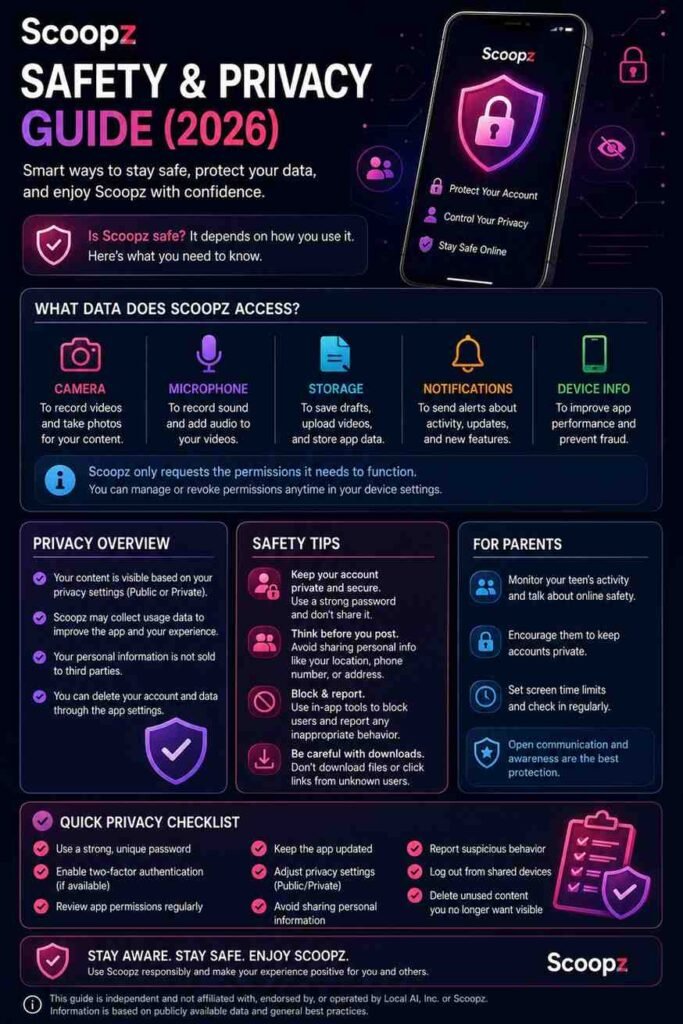
The Short Answer
For an adult user going in with reasonable expectations about a smaller, less-moderated platform: reasonably safe, with the same general precautions you’d apply to any open video-sharing app. For a minor, without active supervision: no — the app carries an official 18+ content rating and currently has no built-in parental controls.
What Data Does Scoopz Collect?
Independent app-permission scans show Scoopz requests access to:
- Precise location
- Camera
- Microphone
These are expected permissions for a video-recording social app — you can’t record and geotag content without them — but “expected” doesn’t mean you should skip reviewing them. Check your device’s app-level permission settings (Android: Settings → Apps → Scoopz → Permissions; iOS: Settings → Scoopz) and disable anything you’re not actively using the corresponding feature for. Location access in particular is worth a second look if you don’t use location-based features, since it’s one of the more sensitive permissions an app can request. Visit our homepage to get Scoopz APP.
Official Content Rating
Both major app stores classify Scoopz as an 18+ app:
- Google Play: Extreme Violence, Users Interact
- App Store: Frequent: Realistic Violence
This is Scoopz’s own store classification, not a third-party accusation — it’s a meaningful signal on its own, independent of any user complaint. An 18+ rating with an active “users interact” component (meaning open, unmoderated-by-default interaction between users) is a materially different risk profile than a platform rated for general audiences.
Content Moderation: What’s Actually Documented
Beyond routine new-platform growing pains, independent consumer review sources have logged serious, specific complaints about content moderation failures on Scoopz — including reports of inappropriate content reaching users, and slow, unhelpful support responses to account and payout disputes. Separately, publicly visible comments on Scoopz’s own promotional content (its TikTok Discover page) include users describing the platform as having minimal content filtering compared to more established platforms.
Qustodio, a well-known parental-control and family safety company, has published its own safety assessment of Scoopz specifically — worth reading directly if you’re a parent doing due diligence, since it’s an independent source built specifically around family safety evaluation rather than general app reviews.
None of this means Scoopz is uniquely dangerous compared to any other open, user-generated video platform — every platform in this category deals with moderation at scale imperfectly. The difference is that Scoopz is a smaller company with less moderation infrastructure than a TikTok or Instagram, and its own content rating reflects that.
Scoopz Safety for Teens?
Given:
- The official 18+ content rating
- The “users interact” classification (open messaging/interaction, not fully curated)
- No built-in parental control features
- Documented, independent complaints about moderation consistency
Treat this as unsuitable for minors without active, ongoing supervision. If a teen in your household wants to use it anyway, the realistic options are:
- Don’t allow it on a device without your direct oversight, given the current gaps
- Pair it with third-party monitoring software if you decide to allow supervised use — Scoopz doesn’t provide this natively, so it needs to come from outside the app (device-level parental controls, family monitoring apps)
- Review the account’s privacy settings together rather than assuming defaults are protective
Privacy Settings Worth Checking
While Scoopz’s exact settings menu can change between app versions, general good practice for any social video app applies:
- Review who can message you and disable DMs if you don’t need them (Scoopz does offer a DM toggle)
- Check whether your account/profile is public by default and adjust if you’d prefer a more limited audience
- Review location settings specifically — disable precise location if you don’t use location-tagged features
- Check third-party login connections if you signed up via Google/Facebook, since those connections can share data between platforms depending on the permissions you granted at signup
Reporting and Blocking
Standard in-app tools for reporting content and blocking users are the correct first step if you encounter something concerning — not a third-party workaround. If you report content and don’t see action taken, that delay is consistent with the moderation-responsiveness complaints noted above; escalate through Scoopz’s official support channel if a report feels urgent (e.g., content involving apparent harm to a minor) rather than assuming the standard report queue will move quickly enough.
General Safety Practices for Any User
- Don’t share identifying personal information (school, workplace, home location) in videos or bios
- Be cautious about geotagging content in real time, especially from your home
- Treat DMs from unfamiliar accounts with the same skepticism you’d apply on any platform
- Keep the app updated — security patches are typically bundled into regular app updates
Frequently Asked Questions
This guide is independent and not affiliated with, endorsed by, or operated by Local AI, Inc. or Scoopz. Safety conditions, permissions, and moderation practices can change — parents and guardians should make their own current assessment before allowing a minor to use any open social platform, and consult resources like Qustodio’s independent safety reviews as an additional reference point.